
Professional Screen Recording for macOS
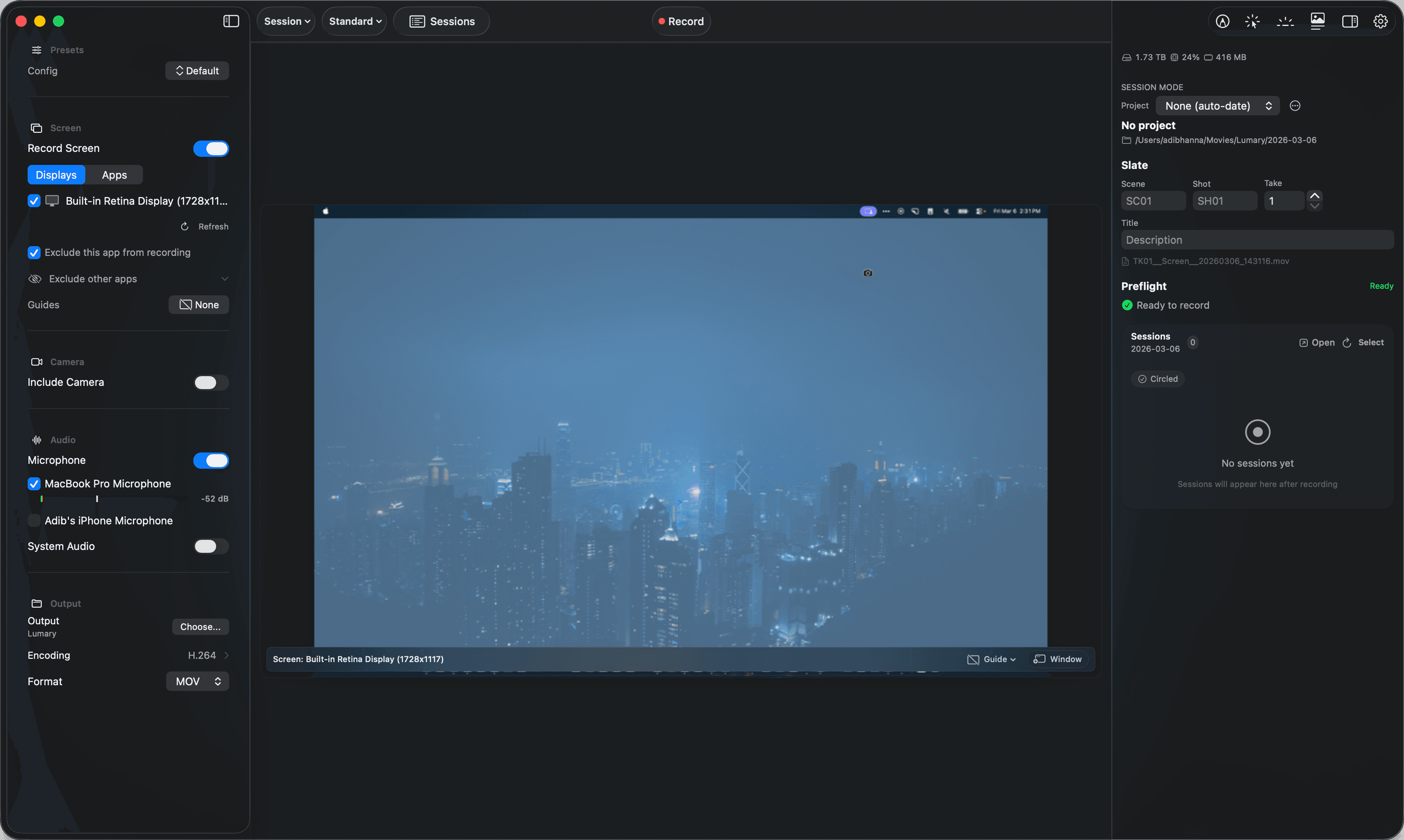
Capture your screen, camera, microphone, and system audio simultaneously — each source saves to its own file for maximum flexibility in post-production. Draw on your screen, highlight your cursor, read from a teleprompter, and switch scenes on the fly — all without leaving your recording.
Features
Everything you need to record
Professional capture, on-device processing, and a native macOS workflow. No cloud, no subscriptions for core features.
Multi-Source Recording
Record screen, camera, microphone, and system audio simultaneously. Each source saves to a separate file for complete control in post-production. Record multiple displays, individual windows, or specific apps — and exclude sensitive apps from capture.
Professional Codecs
H.264, HEVC, ProRes 422 (Proxy through HQ), ProRes 4444/4444 XQ with alpha, AAC, and PCM lossless. All video encoding is hardware-accelerated.
On-Device Transcription
Generate transcripts using Whisper running entirely on-device via Apple Neural Engine. 4 model sizes, 26 languages with auto-detect. Export as SRT, VTT, or JSON. No audio data ever leaves your Mac.
Reliable by Design
Fragmented MP4 output protects against data loss. Automatic crash recovery repairs interrupted sessions. Session checkpoints save state every few seconds.
Production Tools
Slate system for scene, shot, and take tracking. Markers with notes and tags. Projects to save source configurations. Token-based file naming. Real-time audio metering with gain control.
Screen Annotation
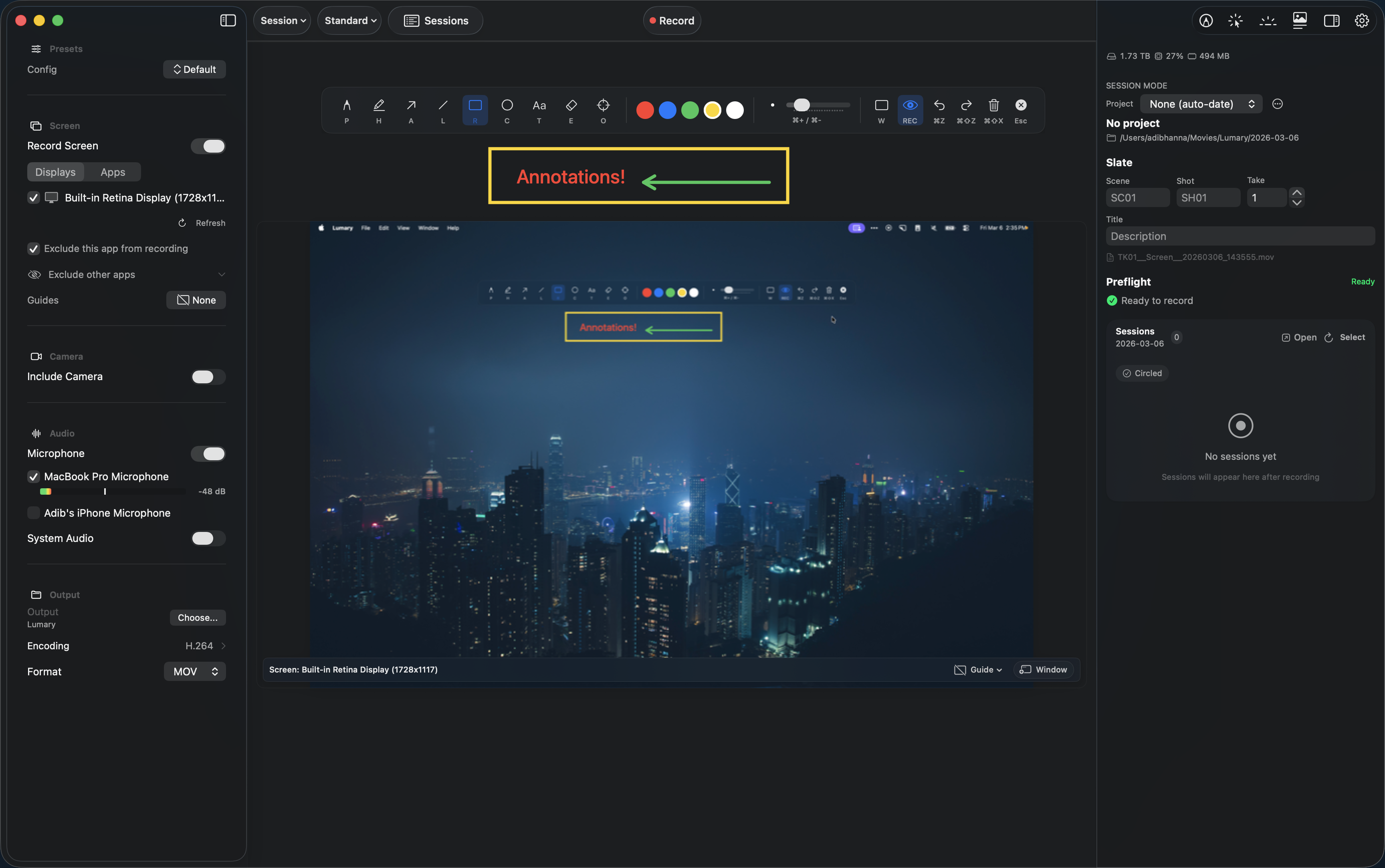
Draw directly on your screen while recording — annotations appear in the captured video. 17 shape types, arrows with smart connections, freehand pen, highlighter, text, eraser, and laser pointer. Group, resize, rotate, and edit any element after drawing. Import custom shapes from Excalidraw libraries. Whiteboard mode turns your screen into a blank canvas.
Cursor Highlight & Spotlight
Make your cursor impossible to miss. Cursor Highlight adds a visual ring, circle, squircle, or rhombus that follows your cursor with click animations. Spotlight dims the entire screen with a bright cutout around your cursor.
Keystroke Display
Show keyboard input on screen during recordings and presentations. Modifier symbols (⌃⌥⇧⌘), standalone modifier keys, special keys, and text appear as floating pills in a horizontal wrapping flow that fade out smoothly. Configurable position, font size, display width, and modifiers-only mode. Settings persist across restarts and in encoding presets.
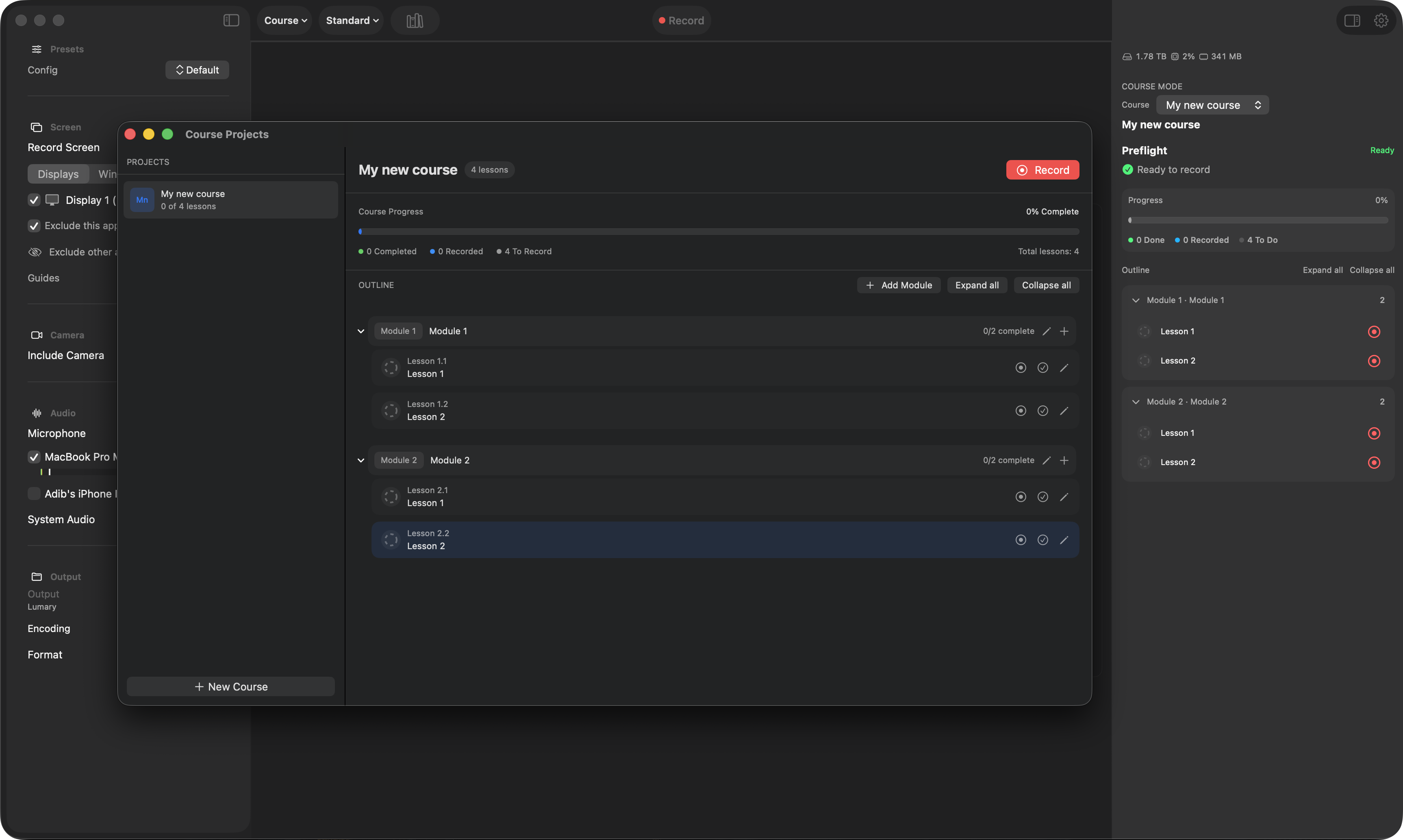
Course Mode
Structured recording for educational content. Organize into courses, modules, and lessons. Automatic take tracking, hero take selection, and progress monitoring.
Composite Mode & Scenes
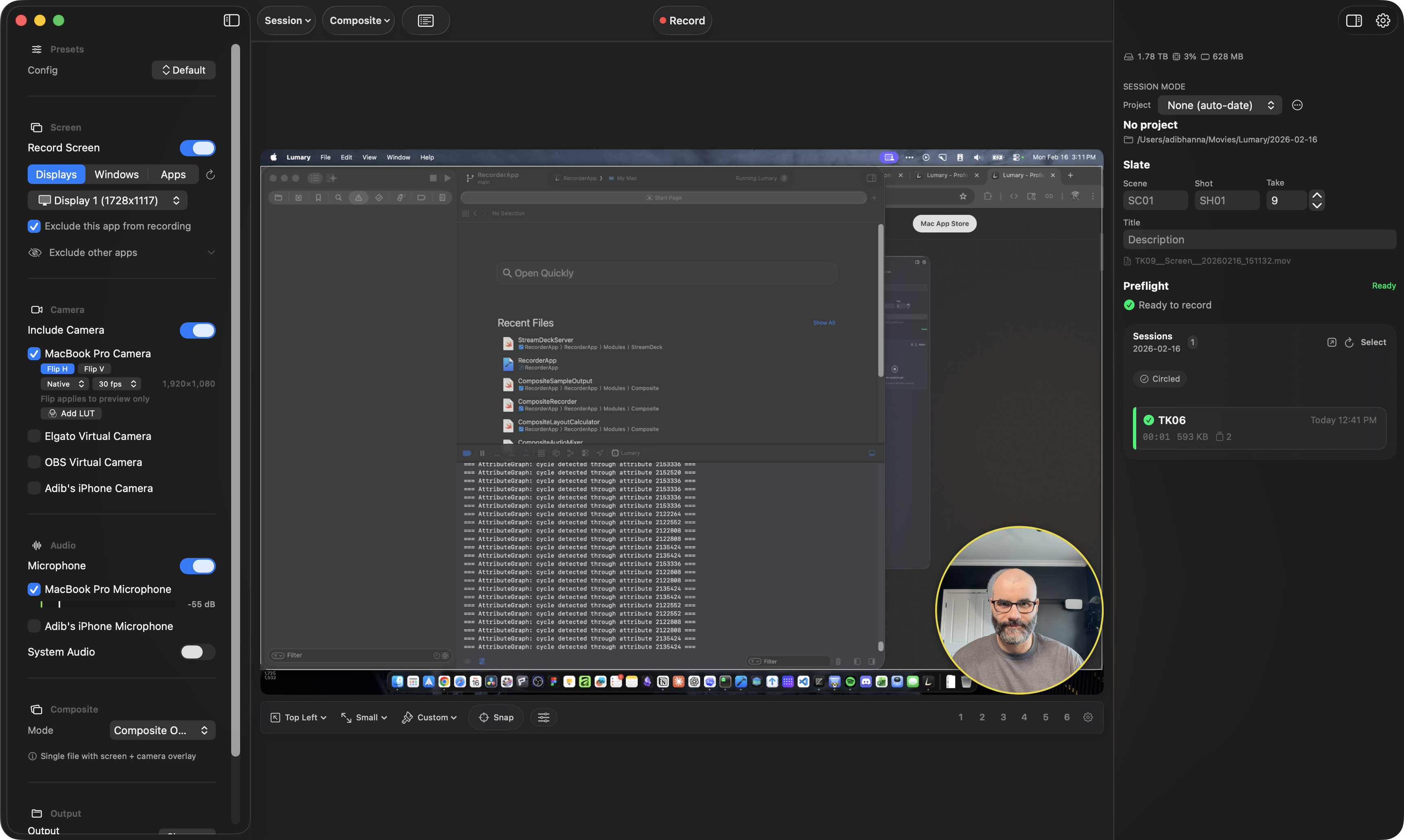
Record screen and camera into a single picture-in-picture composition with Metal-accelerated scene switching. 6 built-in scenes plus unlimited custom scenes, OBS-style panels, source presets, overlay styles, and drop-free recording at 30–60 fps.
Full Stream Deck Support
19 hardware actions for recording, markers, takes, annotation, teleprompter, presentation tools, and scene switching — with a live recording timer. Available on the Elgato Marketplace.
Screen & Camera in One Frame
Record screen and camera into a single picture-in-picture composition with Metal-accelerated scene switching. OBS-style scenes and sources panels, source presets, overlay style presets, and drop-free recording at 30–60 fps.
Draw on Your Screen
17 shape types, arrows with smart connections, freehand pen, highlighter, text, eraser, and laser pointer. Group, resize, rotate, and edit any element after drawing. Import custom shapes from Excalidraw libraries. Whiteboard mode for blank canvas work.
Read Your Script While Recording
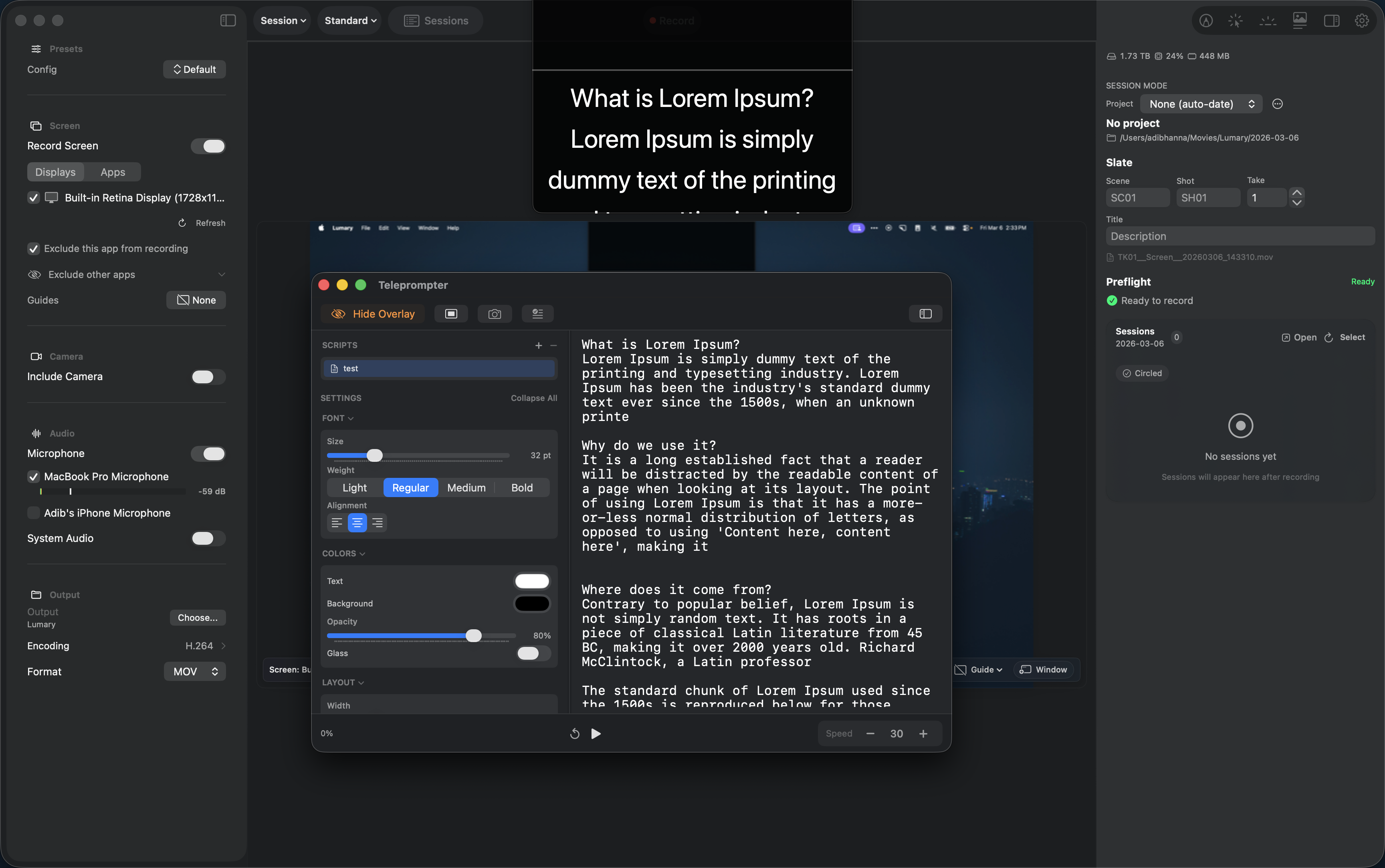
A floating overlay auto-scrolls your script on top of your screen. Multi-script editor, adjustable speed, global hotkeys — and the overlay never appears in recordings.
Structured Recording for Educators
Organize your recordings into courses, modules, and lessons. Track takes per lesson, select hero takes, and monitor progress — all within a purpose-built workflow for educational content.
A workspace that adapts to your process
Detach key panels into independent windows and arrange your workspace for recording, review, and production.
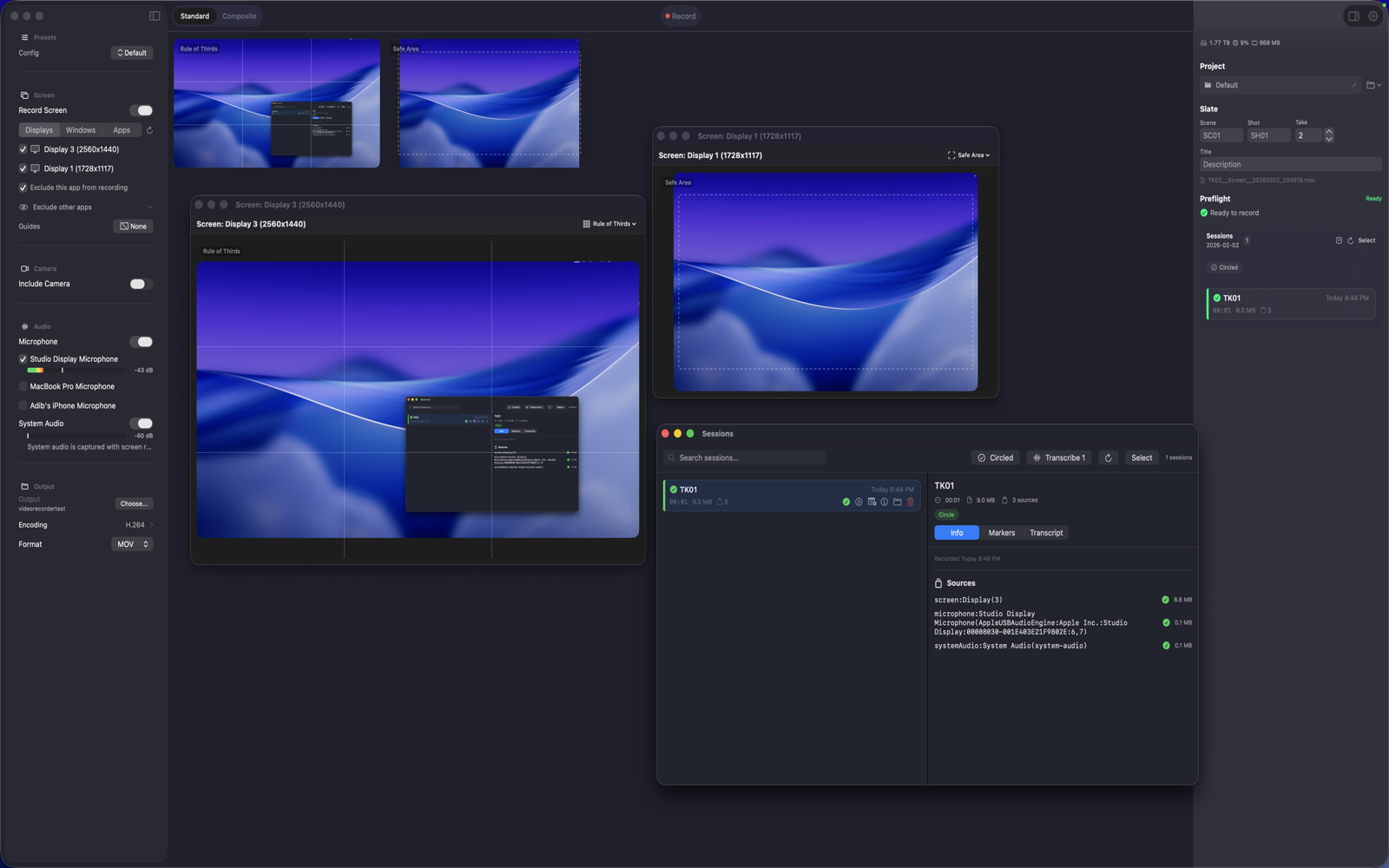
Detachable Panels
Move essential tools into dedicated windows
Live Preview
Monitor exactly what your audience will see
Session Library
Quickly locate and review previous recordings
Use cases
Built for modern production workflows
From solo creators to small teams, Lumary delivers dependable capture and files that are ready for post-production.
Content Creators
Record tutorials, walkthroughs, and reviews with professional quality. Draw on your screen to highlight key points, use cursor spotlight to guide viewer attention, and read from the teleprompter for polished narration. Multi-source recording gives your editor maximum flexibility.
Educators
Create structured course content with Course Mode. Organize lessons into modules, track takes automatically, and mark hero takes. On-device transcription generates captions in 26 languages. Whiteboard mode turns your screen into a teaching canvas.
Developers
Document bugs, record demos, and create technical walkthroughs. Screen annotation highlights code and UI elements. Markers flag important moments. The slate system organizes multiple takes across features and releases.
Podcasters & Streamers
Capture high-quality video for podcasts and stream archives. Composite mode combines screen and camera into a single file with scene switching. ProRes support ensures broadcast-ready output. System audio capture grabs everything your audience hears.
Presenters
Give live demos with cursor highlight and spotlight to guide attention. Annotate your screen in real-time. Read from the teleprompter without breaking eye contact. Control everything from Stream Deck or hotkeys — your audience never sees the tools.
Technical Specifications
Professional formats for every workflow
Capture in delivery-ready formats with hardware-accelerated encoding designed for stable, efficient performance.
Video Codecs
- H.264Universal compatibility, smaller files
- HEVC (H.265)Better quality at lower bitrates
- ProRes 422 ProxyOffline editing, fast turnaround
- ProRes 422 LTLighter professional editing
- ProRes 422Professional editing, balanced
- ProRes 422 HQHigh-quality masters, color grading
- ProRes 4444VFX work, alpha channel preservation
- ProRes 4444 XQMaximum quality with alpha
Audio Codecs
- AAC64–320 kbps, efficient compression
- PCM Lossless16/24/32-bit in WAV or CAF
Caption Formats
- SRTUniversal subtitle format
- VTTWeb-optimized captions
Capabilities
- Max ResolutionUp to 8K
- Frame Rates15, 24, 25, 30, 60 fps
- Color Depth8-bit, 10-bit (ProRes)
- Audio Sample Rate44.1kHz, 48kHz
- Audio Bit Depth16-bit, 24-bit, 32-bit
- Simultaneous SourcesUnlimited*
* Hardware dependent
One session, all your files
Each recording generates a structured session folder with organized outputs for every source.
Privacy First
Privacy by design
Recordings and transcripts stay on your Mac, with no cloud dependency and no background tracking.
No Cloud Services
All processing runs locally on your Mac with no upload pipeline or third-party hosting.
No Analytics
Lumary does not collect telemetry, usage analytics, or recording data.
No Accounts
No registration is required. Install the app and begin recording immediately.
Local Storage
Your files are saved to locations you choose, and remain fully under your control.
Pricing
Straightforward one-time pricing
Purchase once on the Mac App Store with no recurring subscription fees.
Lumary
Professional Screen Recording
- Multi-source recording (screen, camera, mic, system audio)
- Three recording modes (Separate Files, Composite, Course)
- Screen annotation with 17 shapes, smart arrows, grouping, Excalidraw import, and whiteboard mode
- Keystroke display with configurable position, font size, display width, fade duration, standalone modifier keys, and modifiers-only mode
- Cursor highlight and spotlight
- Virtual teleprompter with multi-script editor
- Professional codecs (H.264, HEVC, ProRes, PCM lossless)
- On-device Whisper transcription with SRT/VTT/JSON export
- Production tools (slate, markers, projects, preflight)
- Menu bar status item
- 25+ configurable global hotkeys
- Stream Deck plugin (19 actions) with live recording timer
- URL scheme with 50+ commands
- Crash recovery and session checkpointing
- Composition guides and audio metering
- Camera LUT support and overlay presets
- All future updates for the current major version
Requires macOS 15.0 (Sequoia) or later.
Optimized for Apple Silicon and supported on Intel Macs.
FAQ
Frequently asked questions
Key information about Lumary, compatibility, workflows, and privacy.